RadiAnt 部落格

瞭解最新版本更新、功能介紹和技術分享,掌握 RadiAnt DICOM Viewer 的最新動態

RadiAnt DICOM Viewer 2025.2
May 22, 2025
RadiAnt

RadiAnt DICOM Viewer 2025.2

版本更新 PACS传输 3D视图

RadiAnt DICOM Viewer 2025.2 现已发布,具有更快、更稳定的 PACS 传输功能,特别是在 Wi-Fi 环境下或访问局域网外的 PACS 伺服器时。此次更新显著提升了数据传输速度和连接可靠性,确保从远程伺服器检索研究时的流畅工作流程。

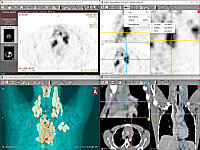
此版本新增了 2D 檢視器、3D MPR 和 3D VR 视图之间的同步轴交叉功能,在不同视角之间切换时更易保持方位感。

此外,修复了某些非标准 DICOM 檔案的顯示问题,提升了整体兼容性。

Original

RadiAnt DICOM Viewer 2025.2 is now available, featuring faster and more stable PACS transfers - especially over Wi-Fi or when accessing PACS servers outside the local LAN. This update significantly improves data transfer speeds and connection reliability, ensuring a smoother workflow when retrieving studies from remote servers.

Also new in this version is synchronized axis intersection across the 2D viewer, 3D MPR, and 3D VR views—making it easier to stay oriented when switching between perspectives.

Additionally, display issues with certain non-standard DICOM files have been resolved, improving overall compatibility.


RadiAnt DICOM Viewer 2025.1
February 22, 2025
RadiAnt

RadiAnt DICOM Viewer 2025.1

安全更新 漏洞修复

最新版本 RadiAnt DICOM Viewer 2025.1 解决了更新检查机制中的安全漏洞。在以前的版本中,具有特权網路访问权限的攻击者可能会操纵更新通知視窗中顯示的内容,存在下載恶意檔案而非合法軟體包的潜在风险。

为确保安全,强烈建议更新至最新版本,或实施安全公告檔案中概述的缓解措施。

Original

The latest release, RadiAnt DICOM Viewer 2025.1, addresses a vulnerability in the update check mechanism.

In previous versions, an attacker with privileged network access could manipulate the content displayed in the update notification window if the user dismissed an alert about an incorrect certificate name. This posed a potential risk of downloading a malicious file instead of a legitimate software package.

To ensure security, we strongly recommend updating to the latest version or implementing the mitigations outlined in our security advisory document.

RadiAnt DICOM Viewer 2024.2
December 23, 2024
RadiAnt

RadiAnt DICOM Viewer 2024.2

新功能 列印功能 PDF匯出

我们最新的 2024.2 版本引入了列印功能。现在可以将 2D、3D MPR 和 3D VR 檢視器中的影像发送到标准列印机或使用 PDF 列印机儲存为 PDF 檔案。在 2D 檢視器中,影像可以按实例编号、空间位置、采集时间或檔案名排序。

此外还包含众多细节改进和修复。完整更新列表请参阅更新日志。

Original

Our latest 2024.2 version introduces printing functionality. Images from the 2D, 3D MPR, and 3D VR viewers can now be sent to standard printers or saved as PDF files using a PDF printer. In the 2D viewer, images can be sorted by instance number, spatial position, acquisition time, or file name. Additionally, we've included numerous smaller improvements and fixes. For a complete list of updates, please refer to the changelog.

RadiAnt DICOM Viewer 2024.1 BETA
February 12, 2024
RadiAnt

RadiAnt DICOM Viewer 2024.1 BETA

Beta版本 匿名化功能 隐私保护

最新的 Beta 版本 RadiAnt 引入了备受期待的 DICOM 匿名化功能。此功能可以无缝刪除 DICOM 檔案中的个人识别信息,允许安全共享檔案而无需担心敏感数据泄露给未经授权的第三方。

使用者还可以方便地自定义和儲存匿名化範本,以便快速高效地重复使用。

Original

The most recent beta version of RadiAnt introduces the highly anticipated DICOM anonymization feature. This feature enables the seamless removal of personal-identifying information from DICOM files, allowing for the secure sharing of files without the concern of sensitive data leaks to unauthorized parties. Users can also enjoy the convenience of customizing and saving anonymization templates for swift and efficient use.

RadiAnt DICOM Viewer 2023.1
April 23, 2023
RadiAnt

RadiAnt DICOM Viewer 2023.1

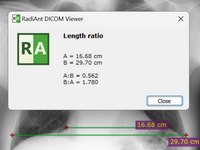
新功能 长度比例 体积计算

我们的最新版本 2023.1 具有各种改进和錯誤修复。此外,我们还引入了两个新功能:长度比例和椭球体积计算。这些新工具为醫學影像分析提供了更精确的测量能力。

Original

Our newest version, 2023.1, features various improvements and bug fixes. For more information, please see the changelog. In addition, we have introduced two new features: Length Ratio and Ellipsoid Volume Calculation.

Multiple RadiAnt PCs with Orthanc PACS
September 21, 2022
RadiAnt

多台 RadiAnt PC 连接 Orthanc PACS

教學 PACS配置 Orthanc

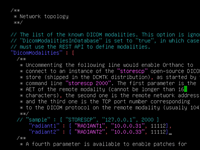
在我们最近的教學中,我们展示了如何在 Linux 机器上安裝 Orthanc PACS 伺服器,并配置两台安裝了 RadiAnt DICOM Viewer 的 Windows PC,以便可以从一台 PC 将 DICOM 研究上傳到 PACS 伺服器,然后在第二台 PC 上检索。

Original

In our recent tutorial we show how to install Orthanc PACS server on a linux machine and configure two Windows PCs with RadiAnt DICOM Viewer installed, so that DICOM studies can be uploaded to the PACS server from one PC, and then retrieved on the second PC.

观看教學视频 (YouTube)